Image Studio
The studio calls itself Beta 0.8 in its own title bar. It arrived with 1.4.2 and it is still changing fast, so read this as a map of what it can do rather than as a manual. More screens will land here as it settles.
Most image tools are a chat that hands you pictures. The studio is a board, full screen, with its own pan and zoom, and it is deliberately separate from your memory canvas: generating is not remembering. Every image is a working plane you place, turn, adjust, duplicate and keep, and the plan itself has a size (3840 × 2160 below, or an infinite plane if you would rather not decide).
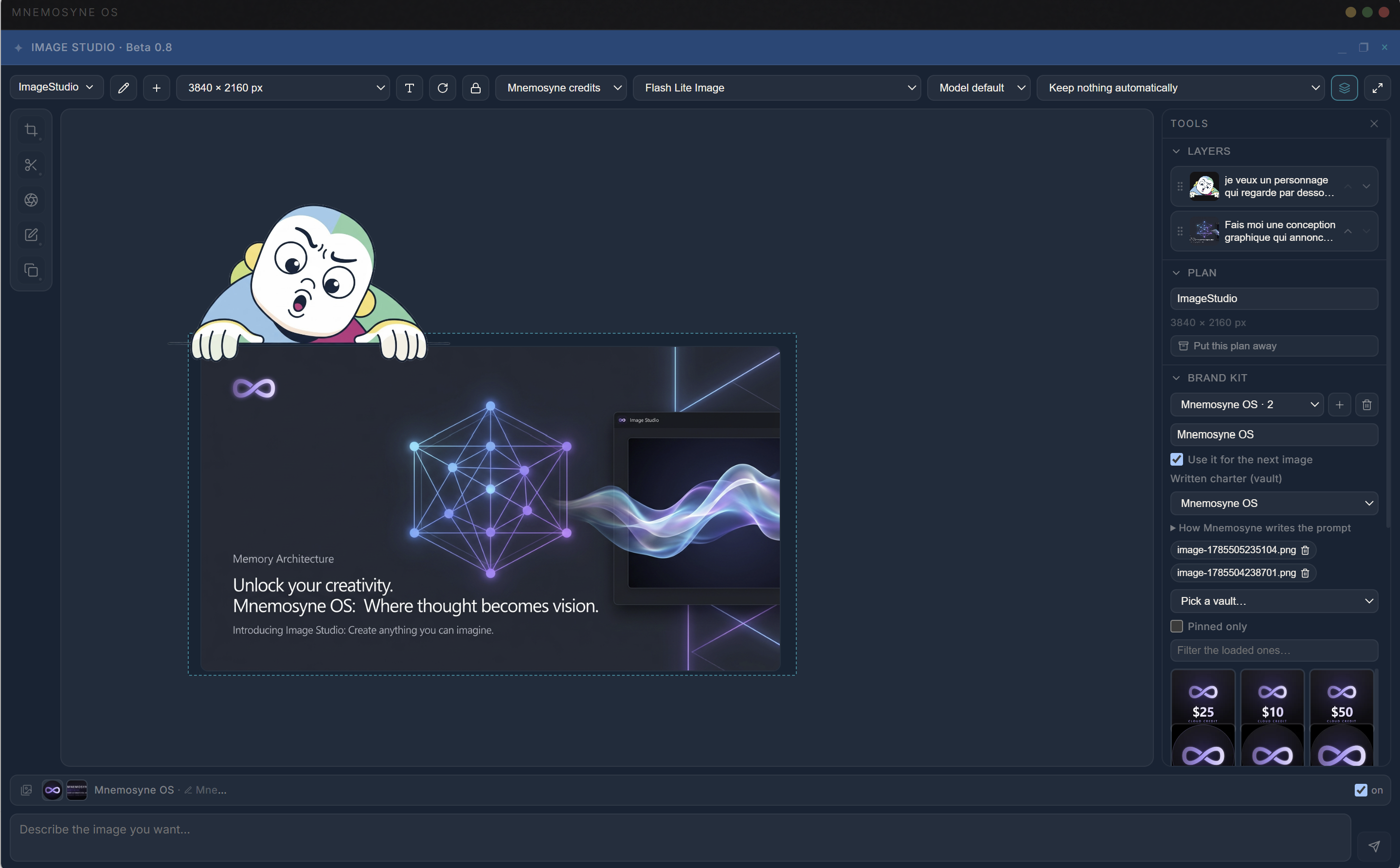
Eight doors to draw through
The Draw with selector decides where a picture actually comes from:
- your own key, with Gemini, OpenAI, xAI / Grok, MiniMax or Qwen
- your Vertex project, the door that can take a real mask
- Mnemosyne credits, billed per image (what each one costs)
- on this machine, a local engine that borrows the Python the image memory already installed
Four different cloud dialects sit behind one shared door, so switching route does not change how you work. A route that cannot draw gives the reason, and one that draws but cannot start from an existing picture names the routes that can.
The brand kit: your memory, inside the prompt
This is the part that only exists here. A kit points at a vault for its written charter and holds pictures from your own memory as references. Ask for an image and Mnemosyne OS reads that vault, writes the prompt itself, and tells you what it stood on: written from 4 excerpts, or nothing found in this vault: written from your words alone. The prompt it wrote opens before anything is drawn, and you can edit how it writes.
In the layers panel each plane is named by the request that made it, which is what turns a board of forty pictures back into a train of thought.
Editing changes the picture you are looking at
The rail on the left holds Frame, Cut out, Focus and Zone, and a floating palette carries Layers, Adjustments, Export and Details. It can be moved, folded and closed, and it remembers where you put it.
Two rules are worth knowing before you start:
- An edit replaces the plane, it does not queue a new one. Cut-outs, manual crops and zones change the picture in front of you, and Ctrl+Z is what makes that safe. The undo button carries the name of the edit it would take back, and an edit that fails puts the original picture back rather than leaving you with a hole.
- A zone is a zone. On a door with a real mask the model redraws only inside it. On the others the whole picture is redrawn and only the zone is kept, and the studio says which of the two is about to happen.
Layout, and the moment it becomes pixels
Turning a plane, mirroring it, or moving the light, contrast, saturation, colour and black point sliders is layout: the file stays the picture the model made, and the panels say so under the cursors. Planes resize and turn by their corners, snap to a square angle, and stack by right-click or by dragging them in the layers list.
When you want that layout in the pixels, bake it. That writes a new picture as a child of the plane it came from, so the image you had is still one plane to the left. Export is the other legitimate exit: the whole board or a single plane, and the PDF keeps the layout at print scale, so a board becomes a page.
What happens to a picture
The top bar carries a keep policy whose default is Keep nothing automatically. A picture waits on the board until you save it into a vault, put it on the canvas, or throw it away.
On this machine
The local engine borrows the Python the image memory already installed, so it starts from Settings → Images rather than from a second install of its own. The model list sorts by category, by what fits this machine, by speed or by quality, tells you plainly when a model is too big for the machine you have, and takes your own models by repository name or by a folder on disk. A download can be stopped and resumed, and a loaded model can be released.
Two limits while this is written: the local engine draws from text, so working from an existing picture and zone edits still go through a cloud door, and it runs on the processor until the GPU step lands.