Models & credits
Mnemosyne OS ships without a brain wired in. You choose what thinks, and you choose how you pay for it.
There is no subscription anywhere in this app.
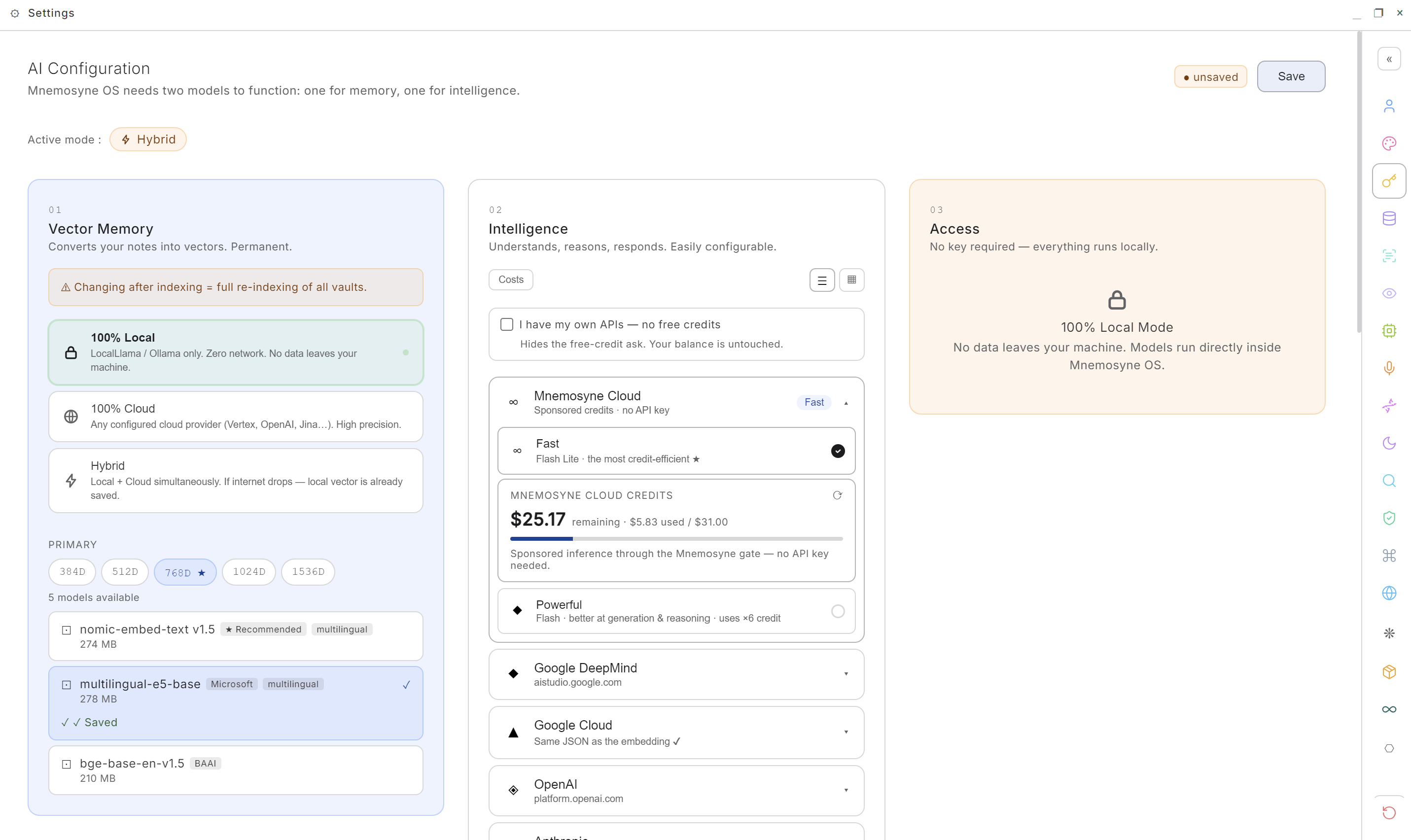
It takes two models to run: one to remember, one to think. Both live in one screen, Settings → AI & Models, headed AI Configuration, with the memory model on the left, the thinking model in the middle, and what that combination requires on the right.
What an embedding is
The vocabulary first, because the rest of the page rests on it.
An embedding turns a piece of text into a list of numbers, a point in a space of several hundred dimensions. The model that produces it was trained so that meaning becomes position: two sentences that say the same thing land next to each other even with no word in common, and two that merely share vocabulary land far apart.
That is what makes memory work here. Nothing hunts for keywords. Your question becomes a point, and the OS returns the chronicles sitting closest to it. It is why "what did I decide about pricing?" can surface a note that never contains the word pricing.
Two consequences worth carrying to the rest of this page:
- The embedding model only places things. It never writes you a word, never reasons, never translates. The model that speaks is a different one, further down.
- Every memory is filed at coordinates one model computed. Change the model and those coordinates mean nothing any more, so the index has to be rebuilt. That warning has teeth, and it comes next.
The embedding model, the one that remembers
That is the left column of the screen above. Two rules before you touch it:
- The dimension pills come first. 384D → 1536D filters the list, and 768D is the native dimension of Mnemosyne OS. More dimensions means finer distinctions and a heavier index, fewer means faster and lighter.
- Changing it after indexing re-indexes everything, and the app makes you confirm. Two models of the same size sit in different vector spaces, so an index built by one reads as noise to the other. Nothing crashes, retrieval simply goes quiet. That confirmation dialog is the most important one in the app.
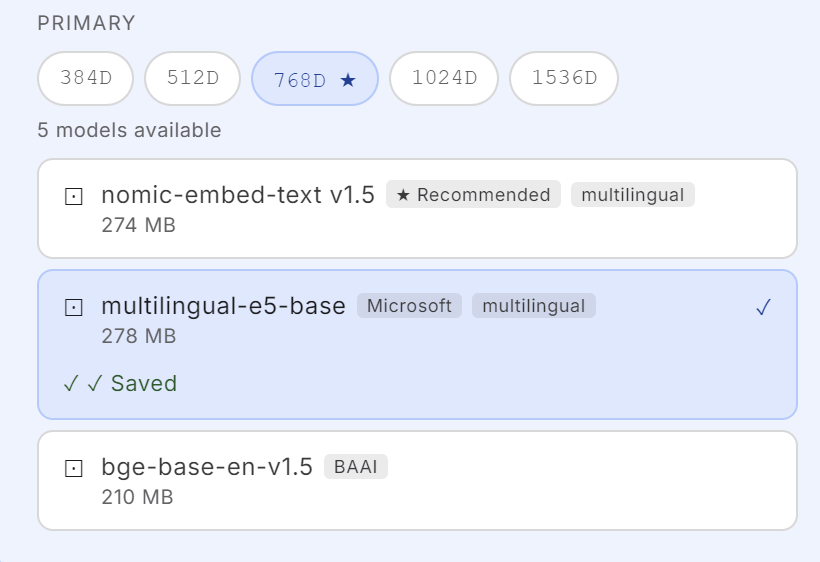
Embedding asks little of your machine. The two recommended 768D models weigh 274 MB and 278 MB, the sizes the picker shows next to each name, and they run on the processor. A machine with 16 GB of RAM handles 768D without thinking about it. What needs a big machine is a local model that writes answers, and that is a separate choice on the right of the same screen.
At the native 768D, three models run locally:
| Model | Size | Built for |
|---|---|---|
| nomic-embed-text v1.5 | 274 MB | English, and long passages (8 k window) |
| multilingual-e5-base · Microsoft | 278 MB | ~100 languages, and across them |
| bge-base-en-v1.5 · BAAI | 210 MB | English only |
Other dimensions hold the extremes: all-MiniLM-L6-v2 (22 MB, 384D) for the
lightest possible machine, bge-large-en-v1.5 and gte-large (~620 MB,
1024D) for English precision. The cloud embedders (Jina, Vertex, OpenAI) are
there if you would rather rent that job too.
Why E5 if you don't think in English
Because an English-centric embedder will make the OS speak your language perfectly and remember it badly. That is the one failure a memory OS cannot afford: the chat is the part you see, retrieval is the part that does the work.
The chat model translates. The embedding model projects your sentence into the space it was trained on. If that space was learned almost entirely from English, an English-only model has a shaky sense of what your sentence means, and two of your notes that say the same thing may land no closer together than two unrelated ones. The OS answers, politely, that it doesn't remember.
multilingual-e5-base was trained on around a hundred languages and on pairs across them, which buys you two things:
- Your notes are compared to each other on meaning, in your own language.
- A question in one language finds a note written in another, which is what actually happens in real vaults: English documentation, notes in your language, and one memory holding both.
This is why the ★ in the picker moves with your shell language: English gets nomic, every other language gets multilingual-e5-base. The star is an opinion about you.
The trade: e5 reads in smaller mouthfuls (a 512-token window against nomic's 8 k), and weighs 4 MB more. That is the whole price.
Intelligence, the three routes
The middle column: the model that thinks, reasons and writes. Three ways to get one, and you are not locked into any of them.
| Route | What you pay | What leaves your machine |
|---|---|---|
| 100 % local | nothing, ever | nothing |
| Your own key (BYOK) | your provider, directly | your prompts, to the provider you chose |
| Mnemosyne credits | a prepaid balance | your prompts, through our metered proxy |
- 100 % local: a model downloaded once (Qwen, Gemma, Phi…) running in your RAM. Free, private, offline. The price is memory, so see the route-per-machine table.
- Your own key: Google AI, OpenAI, Anthropic, DeepSeek, Groq, Mistral, MiniMax or Vertex AI. Your key is encrypted on this machine, your calls go straight to your provider, and we take nothing. Tick I have my own APIs — no free credits and the app stops asking.
- Mnemosyne credits: no key, no account to open anywhere. A balance that goes down when you talk to a cloud model.
You are not locked into one route. You can hold all three at once and switch brain per message from the pill at the top of the chat.
The local models
The local route lives in that same column, below the cloud providers:
sixteen GGUF models, downloaded once from HuggingFace and run inside
the app. This is node-llama-cpp, so there is no external runtime to
install. Every line states its weight, its RAM minimum and its context
window before you commit to a download, and the ones already on disk
carry a green Downloaded.
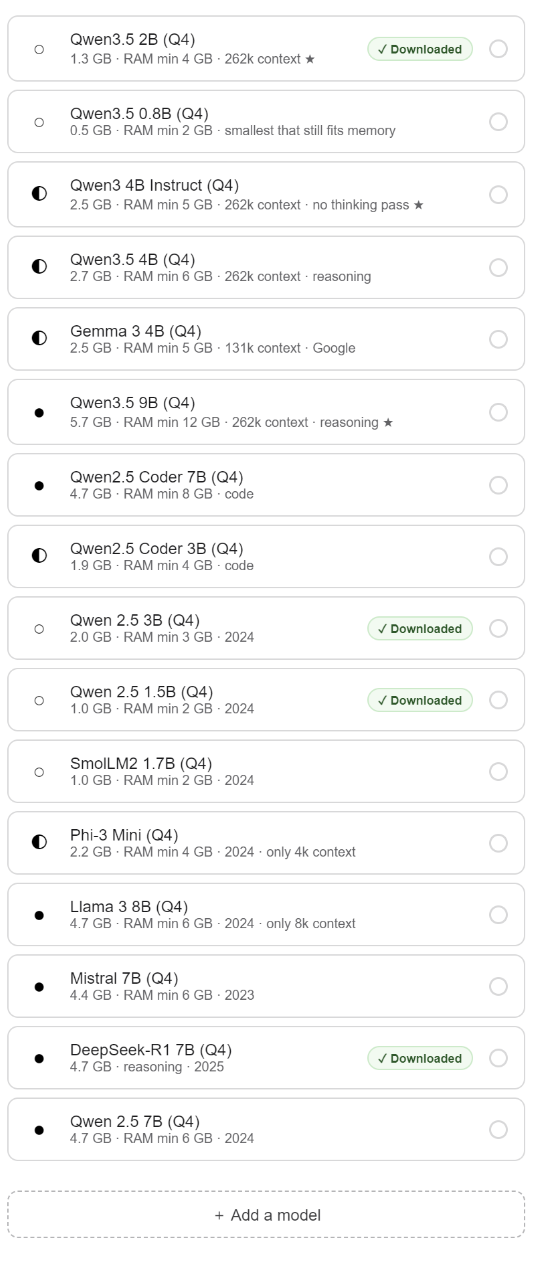
The glyph on the left is the size class (○ ultra-light, ◐ light, ● standard), and ★ marks the pick of its tier.
| Tier | Models | For |
|---|---|---|
| Ultra-light ○ | Qwen3.5 2B ★ · 1.3 GB, 4 GB RAM · Qwen3.5 0.8B · 0.5 GB, 2 GB RAM | the floor: small machines, and the fallback |
| Light ◐ | Qwen3 4B Instruct ★ · 2.5 GB, 5 GB RAM · Qwen3.5 4B · 2.7 GB · Gemma 3 4B · 2.5 GB | the tier most people actually run |
| Standard ● | Qwen3.5 9B ★ · 5.7 GB, 12 GB RAM | reasoning, on a large machine |
| Code | Qwen2.5 Coder 7B · 4.7 GB · Coder 3B · 1.9 GB | code work |
| Superseded | Qwen 2.5 7B / 3B / 1.5B, SmolLM2 1.7B, Phi-3 Mini, Llama 3 8B, Mistral 7B, DeepSeek-R1 7B | kept so existing installs keep working, each carrying its year in the list |
Three things worth reading on those lines:
- 262k of context across the Qwen3.5 family, so a small model can still hold a long conversation and a generous slice of recalled memory.
- "no thinking pass" on Qwen3 4B Instruct: it answers without reasoning out loud first. On a modest machine that is the difference between fast and unusable. The ones marked reasoning think before answering, which buys better answers and longer waits.
- "only 4k context", "only 8k context" on Phi-3 Mini and Llama 3 8B. Written on the model.
Bring your own model
The list is not a walled garden. At the bottom of it: + Add a model.
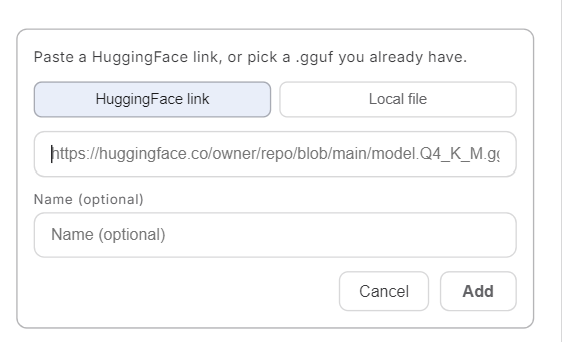
Two doors, because people arrive holding two different things:
- A HuggingFace link: the address of the file page you are looking at, pasted as it is.
- A local file: a
.ggufyou already have. If you keep a models folder for another tool, point at it. Nobody should re-download eight gigabytes.
A name is optional, and the link is checked before it is saved. A
refusal names its reason: that file is not a .gguf · this model is split
across several files, pick a single-file quantization · this model is gated,
accept its licence on HuggingFace first · not found · could not reach
HuggingFace. A bad paste fails here, in one sentence, rather than ten
minutes later as a download that was never going to finish.
Why credits, and not a subscription
Because a subscription bills you for the months you don't use it.
- You pay for what you actually run. A quiet week costs nothing.
- Nothing renews, nothing to cancel. You buy a balance, it goes down, it stops. There is no card kept on file, no anniversary date, no cancellation page to hunt for.
- You can pay us nothing at all. Bring your own key, or stay local. Both routes are first-class, and neither sends us a cent.
Credits exist for one reason: so that someone can use a strong cloud model without opening an account at Google or OpenAI, without managing an API key, and without a monthly line on their bank statement.
The licence follows the same rule. The Engramm is a single purchase, lifetime, activated on-chain. See the Sovereign Wallet.
What a credit is worth
Two cloud tiers, and the price of each is written before you spend it, not after:
- Fast: Flash Lite, the most credit-efficient.
- Powerful: Flash, better at generation and reasoning, and it says so on its own line, uses ×6 credit.
The pricing rule, in plain sight: the provider's public list price × 1.35 (today's coefficient). The difference funds the proxy, the licence gate and support. The list price is public, so anyone can redo the arithmetic.
Text, per million tokens
| Tier | Model behind it | List in | List out | You pay in | You pay out |
|---|---|---|---|---|---|
| Fast | gemini-3.1-flash-lite | $0.25 | $1.50 | $0.34 | $2.03 |
| Powerful | gemini-3.5-flash | $1.50 | $9.00 | $2.03 | $12.15 |
Thinking tokens are billed as output. A model that reasons before it answers spends on the expensive side of the table, which is most of the gap between the two tiers in practice.
Images, per generated image
Pictures are not billed per token. Google publishes a flat price per image and per resolution tier, so the studio asks for the 1024px tier and the table below is that tier.
| In the studio | Model | List | You pay |
|---|---|---|---|
| Flash Lite Image (default) | gemini-3.1-flash-lite-image | $0.0336 | $0.045 |
| Flash Image | gemini-3.1-flash-image | $0.067 | $0.090 |
| Pro Image | gemini-3-pro-image | $0.134 | $0.181 |
| Flash Image (2.5), the one Google nicknamed Nano Banana | gemini-2.5-flash-image | $0.039 | $0.053 |
The list prices are Google's own, read from its public pricing page: the text models on 2026-07-29, the image models on 2026-08-27. The coefficient can change, and the list prices move when Google moves them, so read the table as dated rather than as a contract. What does not change is the rule: one list price, one multiplication, in one place.
Recharging, redeem codes and the balance bar all live in the Sovereign Wallet.
The cost journal
The Costs button sits at the top of the Intelligence column, in the screen above. It opens the journal: every call, its model, its cost.
Two sections that are never merged, because they are not the same kind of number:
- Debited · Mnemosyne Cloud: what the gate actually charged. An authoritative figure, computed on their side.
- Estimated · your own key: those calls go from your machine to your provider, and the billed detail stays theirs. You enter your rate ($ / 1M tokens), the OS counts the tokens.
A call whose price cannot be known shows nothing, never a zero. A zero would claim it was free. The total says how many calls it could price, and how many it could not.
What "100 % local" really means
Local model and local embeddings: the thinking and the memory both stay home. No prompt, no chronicle, no index leaves the machine.
The System Diagnostics widget counts every byte the app puts on the wire, live, since launch.