Install
System requirements
Mnemosyne OS runs its engines on your machine. The hardware you give it decides how much of the OS wakes up.
- Memory (RAM): 8 GB minimum, enough to run the OS in a simple, degraded mode. 32 GB recommended to run every engine at full capacity.
- Disk space: the app itself is light. Every engine you enable (voice, image memory, local models, OCR) downloads its models locally. With all engines active, plan for more than 30 GB.
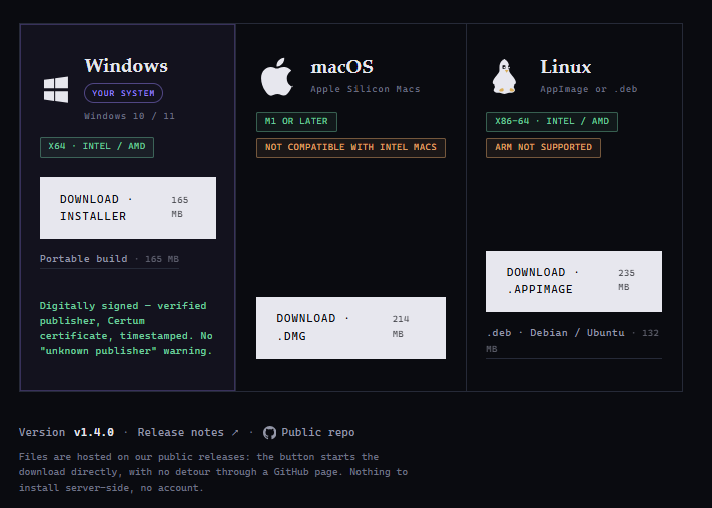
- Windows: Windows 10 or 11, 64-bit (x64, Intel/AMD).
- macOS: Apple Silicon only, M1 minimum. Intel Macs are not compatible.
- Linux: x86-64 (AppImage or .deb). ARM is not supported.
The macOS build requires Apple Silicon (M1 or newer). Mnemosyne OS does not run on Intel Macs.
Download
Get the installer from mnemosyne-os.io/download. One card per platform, and the button downloads directly. The files sit on the project's public GitHub releases, so there is no account to create and nothing to set up on a server.
Installing for an organization rather than for yourself? The enterprise, lab and institution questions are handled on mnemosyne-os.com.
The Windows installer is digitally signed with a Certum certificate, so it shows a verified publisher instead of an "unknown publisher" warning. A portable build is available on the same page.
Install steps with screenshots are being written.
- Windows: signed installer (Certum), what SmartScreen may show and why, install steps, where the app lives.
- macOS: install steps and the first-open dialog.
- First launch: what the app creates on disk, and where. Nothing leaves your machine.
- Updating: how in-app updates work.