Connect your coding agent's memory
Attaching an agent's memory folder needs 1.4.3 or later.
Your coding agent writes down what it learns: the rules of the project, the
traps it paid for once, the decisions it should not have to make twice. That
adds up to a few hundred kilobytes, and almost every line is useful. The notes
sit on your disk in .claude/, .cursor/, .aider/ or .continue/, next to
the code.
From 1.4.3 you can point a vault at that folder and ask your memory what your agent knows.
Dot folders are accepted
DocWatch reads a folder whose name starts with a dot once you have declared
it. You can watch the memory folder of Claude Code, Cursor, Aider or Continue.
Inside it, DocWatch still skips dot entries: a .git or a .DS_Store stays
out.
Create a dedicated vault
Do not add this folder to an existing vault, create a new one.
Mnemosyne OS looks the answer up in a vault, and you pick that vault by its name. Call it Claude memory and you will always know where to aim. Let it mix with your project vault, and one question reaches both.
Attach the folder
Open Configure DocWatch in the vault's Sources:
- Folder to watch: the agent's memory folder.
- File extensions:
md. The notes are Markdown, and this extension leaves the rest of the folder out. - Scan and preview lists the files before it reads a single one.
Press Save this watch
The Save this watch button starts the watch. Files arrive after you press it.
The same dialog holds the optional settings: a description of the folder, a forced spine type, the auto-approve patterns and the maturation delay.
Past 150 files, the app asks you
A Large catch-up screen opens and waits for your answer: Start, Start slowed or Not now. Every watched folder follows this rule.
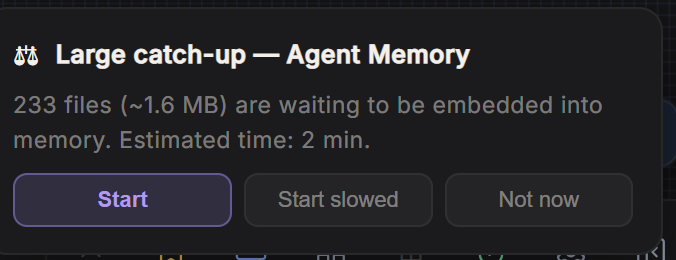
Two things to keep in mind:
- The number on screen is a minimum. More files can be waiting.
- Answer while the screen is open. If you choose Not now and close the app, reopen the source to get the proposal back.
What to give it
Give it the notes and the rule files: the memory folder, and the CLAUDE.md
or AGENTS.md at the root of your project. Those files hold one conclusion at
a time, each with its own reason, and recall finds them well.
The md extension leaves the rest out: the session transcripts, which are
large and hold few conclusions, and the settings files such as settings.json
or .mcp.json, which hold API keys.
Read the sources, not the score
The answer lists the files it stood on. Those tell you whether your question was covered.
Hand these rules to the agent itself
Everything above is a setup you do once and then have to remember. The same
rules ship as a skill, a folder your agent reads on its own:
Mnemosyne-OS/agent-memory-skill,
MIT. Copy its agent-memory/ folder into ~/.claude/skills/ to have it in
every project, or into a project's .claude/skills/.
git clone https://github.com/Mnemosyne-OS/agent-memory-skill

# Every project on this machine
cp -r agent-memory-skill/agent-memory ~/.claude/skills/

# Or this project only, from its root
cp -r agent-memory-skill/agent-memory .claude/skills/
It carries four things this page has already explained, so the agent applies them without being told twice:
askfinds,querycites. Measured on a 306-chronicle memory vault on 2026-08-31, same question, same minute:queryreturned three unrelated chunks scored 0.893, 0.894 and 0.900, and the right note was not among them, whileaskreturned the exact answer with that note as its first source. So ask to find, then query on a phrase you saw there when you need the passage verbatim.- The score cannot be thresholded. A miss and a hit land in the same range, which is the rule above. The skill is what makes an agent obey it.
- Write files, never a hand-made ingest. The file is the source of truth and the vault is its mirror. A chronicle ingested directly has no file behind it, so a correction written later does not supersede it and both versions sit there with equal authority. Writing the file is the ingestion, since the watched folder does the rest.
- The arithmetic of the ceiling you are escaping. An index of 293 entries costs 16.1 KB in titles and links alone, against a read limit of about 17 KB, and what does not fit is cut without a message. Shortening the hooks is a rounding error at that point.
Three things it is not, and the skill says so too:
- Not a replacement for the agent's memory. The vault needs Mnemosyne OS running. With the app closed, the flat files are all your agent has.
- Not private by itself. The text is embedded on your machine by the local embedder, and goes to the provider if you have configured a cloud one. Check which one you are on before assuming.
- Vaults are not encrypted by default. Encryption at rest exists, and you arm it yourself.
For the other direction, letting Claude or Cursor read your memory, see Connect Claude to Mnemosyne OS. The engine behind this page is DocWatch.